
Roomgpt by Crewlab
Crewlab LLCHouse & Home
4.211.00 Reviews
- Version
- 2.21.2
- Installs
- 50.00K
- Age Rating
- Everyone
Screenshots
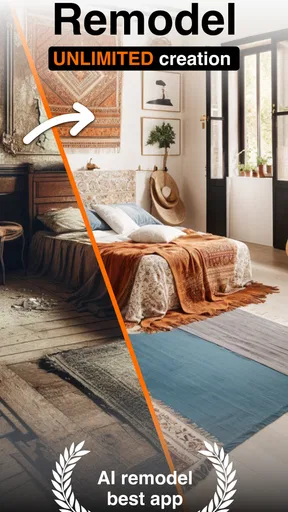
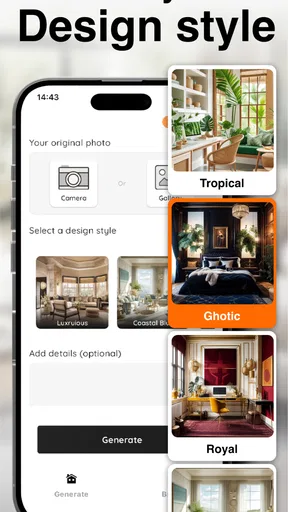
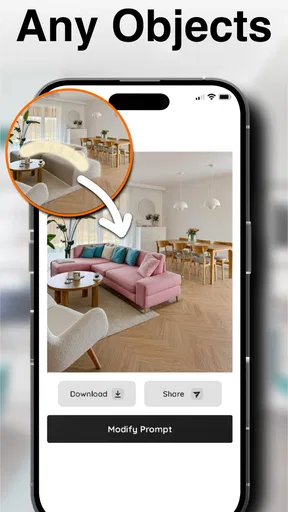
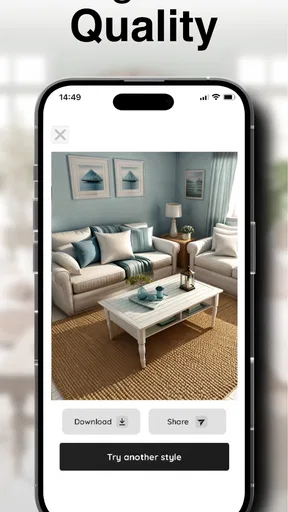
Our Review of Roomgpt by Crewlab
 Analysis by Appyee
When I’m deciding how to refresh a room, the hardest part is often choosing a direction before spending time or money on it. A photo can help me compare ideas more clearly than a mood board alone, especially when I’m trying to picture a change in a space I already know. That is the appeal of Roomgpt by Crewlab: it brings AI-assisted interior design into a mobile app and gives me a way to explore possibilities around my own home.
What to decide before you start
I’d treat Roomgpt as an idea-finding tool, not a substitute for a designer, a floor plan, or careful measuring. It can help answer questions such as whether a lighter look feels right, or whether a room might suit a different decorative direction. It is less suited to decisions that depend on exact dimensions, construction details, or a guaranteed match to a particular piece of furniture.
That distinction matters because a convincing image can feel more practical than it really is. Before acting on a design, I’d check the room’s measurements, outlets, windows, walkways, and existing furniture separately. A visual concept can spark a good plan, but it should not be treated as proof that every suggested object will fit or that the result can be recreated exactly.
A quick way to compare possibilities
For a renter, first-time homeowner, or anyone stuck between two styles, the useful question is not “Can AI decorate my whole home?” but “Can this help me make the next decision?” Trying a few visual directions can make it easier to discuss a room with a partner or family member, or to decide whether a small refresh is worth pursuing.
I would also go in with one clear goal rather than asking for a perfect finished room. For example, focus on the overall mood, a color direction, or how a room might feel with a different arrangement. Keeping the question narrow makes it easier to judge the output and reduces the temptation to treat every generated detail as a recommendation.
As a House & Home app, Roomgpt is aimed at people thinking about their living spaces rather than at professional design workflows. Crewlab LLC develops it, and its free entry point makes it approachable for casual experimentation. The app has an average rating of 4.2 from around 3,300 ratings, with more than 50,000 installs, so it has found an audience among people interested in trying AI-based room ideas.
First Impressions and Features
Okay, let’s talk first impressions. When you fire up Roomgpt by Crewlab, you’re greeted with a clean and intuitive interface. It’s kind of like walking into a neatly organized room—everything’s in its place, and you know exactly where to start.
The app’s main selling point is its ability to generate room designs based on your preferences. You can either upload pictures of your own room or choose from a gallery of sample rooms. Once you’ve done that, the fun really begins. The app uses AI to whip up different design options, which you can tweak to your heart’s content. It’s like playing a game of The Sims, but with your actual living space.
Customization Galore
One of my favorite things about Roomgpt is the level of customization it offers. You’re not just stuck with a few preset designs—you can mix and match different elements to create something that truly reflects your style. From colors and textures to furniture and decor, the possibilities are endless. The app even lets you save your designs, so you can come back to them later or show them off to friends and family.
The app’s AI is pretty impressive. It suggests design elements that complement each other, which is perfect if, like me, you sometimes struggle with making decor decisions. It’s like having a design-savvy friend offering you tips and tricks along the way.
Turning ideas into a useful shortlist
A practical way to use those options is to compare them against the room’s real constraints. If a result makes a narrow space feel crowded, note that before getting attached to its colors or decor. If the overall mood works but a detail does not, keep the mood as inspiration and change the detail in your own plan. This keeps the app useful even when an AI image is not a faithful renovation preview.
For an everyday example, imagine wanting to make a spare room feel less like a place where boxes collect and more like a comfortable guest room. I’d take a clear photo, try a couple of distinct directions, then save the one that feels most welcoming. After that, I’d check which existing items could stay and make a short list of practical changes. The benefit is not that the app decides what to buy; it helps turn a vague “this room needs something” into a visual starting point.
Ease of Use
Now, let’s talk ease of use. I’m all about apps that don’t require a PhD to navigate, and Roomgpt fits the bill nicely. The app guides you smoothly through the design process, and even if you’re not tech-savvy, you’ll find it easy to use. Each step is straightforward, and there are helpful tips along the way to ensure you’re getting the most out of the app.
Another cool feature is the augmented reality option. You can visualize how a design will look in your actual room using your phone’s camera. I spent a good chunk of time walking around my house, phone in hand, seeing what different designs might look like. It’s pretty cool, and it definitely helps when you’re on the fence about whether a certain style will work.
Getting more from a room photo
For a more useful comparison, I’d keep the photo conditions consistent when exploring different looks: use a clear view of the room, avoid changing the camera angle between attempts, and include the features that shape the space, such as a window or doorway. That way, differences between results are easier to interpret. If the image leaves out a corner or hides a tight walkway, I would not use it to judge layout decisions.
The camera-based preview is best treated as a sense-check rather than a measuring tool. It can help me imagine how a general look might sit in the room, but I would still test paint samples in the actual light and measure furniture before ordering anything. This is especially important in small rooms, where a modest change in scale or placement can affect how usable the space feels.
How it compares with other ways to plan
Compared with browsing inspiration photos, Roomgpt’s advantage is that the starting point can be a room like yours instead of someone else’s finished home. That makes it easier to discuss a possible direction with someone who shares the space. A standard mood board remains better when you want to collect exact products, materials, and references in a deliberate order, while a professional designer is a stronger choice when the job involves complex layouts, renovation decisions, or a need for precise plans.
It also occupies a different role from shopping and floor-planning tools. Those can be more useful when the main question is whether a specific item fits or where it should go. Roomgpt is more helpful earlier, when the question is what kind of look you want to pursue. I’d use it to narrow the direction, then switch to measurements, product research, or professional advice as the project becomes more concrete.
Cost, access, and expectations
Roomgpt is free to download, though it offers in-app purchases priced from $9.99 to $114.99 per item. I’d begin with the free experience and decide whether it is useful to my own process before considering a purchase. Since paid items can vary in cost, it is worth checking the in-app details carefully and asking whether the extra spend solves a real need rather than simply promising more experimentation.
The app is rated for Everyone and is listed for devices running Android 7.0 or later. Its current version is 2.0.4, and it was released on April 21, 2025. Those details help set expectations about access, but they do not change the main decision: this is a creative aid for exploring interiors, not a technical planning system.
When a different option makes more sense
I would skip Roomgpt if I needed exact dimensions, a reliable construction drawing, or a shopping list tied to specific products. I’d also be cautious if I wanted a precise preview of a costly renovation, because an attractive generated design can omit practical constraints. In those cases, a measured floor plan, a product visualizer, or a qualified interior professional is a better next step.
There is also a trade-off in using AI-generated concepts: the results may look polished while including details that are difficult to reproduce or do not suit the room’s real proportions. I would use the output as a conversation starter, not as a promise. That framing makes it easier to enjoy the creative part without mistaking inspiration for a finished specification.
Final Thoughts
So, after a few days of experimenting with Roomgpt by Crewlab, would I recommend it? Absolutely. If you’re someone who loves home decor or even if you’re just looking to refresh your space, this app is a fantastic tool. It’s user-friendly, packed with features, and genuinely fun to use.
The app does have some room for improvement. Sometimes the AI-generated designs can be a bit off, and you might find yourself making more tweaks than expected. But honestly, that’s part of the fun, right? You get to put your personal stamp on things, which is what home design is all about.
All in all, Roomgpt is a great option for anyone wanting to explore new design ideas without breaking the bank. Plus, it’s just plain fun to see what your space could become with a little imagination and a lot of AI magic. Give it a try, and who knows? You might just find the perfect look for your home.
My clearest recommendation is to use it when you want momentum: you have a room that feels unfinished, but you cannot yet describe what would improve it. Try a few directions, save the most promising one, and use it to guide a real-world plan. If your priority is exact execution rather than inspiration, choose a more precise planning route instead. That makes Roomgpt a worthwhile first step for curious home decorators, while keeping expectations grounded.
Verdict
Strengths of Roomgpt by Crewlab
- Easy-to-use interface for all users.
- Quick generation of room designs.
- High-quality, realistic visual outputs.
- Supports multiple room styles.
- Frequent updates with new features.
Limitations of Roomgpt by Crewlab
- Limited free version access.
- Requires stable internet connection.
- Occasional lag on older devices.
- Some features need premium access.
- Ads can be intrusive at times.
Similar Picks in This Category
View All
Universal TV Remote Control
CodeMatics Media Solutions3.9

AlfredCamera Home Security app
Alfred Systems Inc.4.7

Planner 5D: AI Home Design
Planner 5D4.5

Universal Tv Remote-Cast to TV
One Music Player4.1

Zillow: Homes for Sale & Rent
Zillow Group4.8

99acres Buy/Rent/Sell Property
infoedge.com4.3
Frequently Asked Questions
What is Roomgpt by Crewlab, and what does it do?
Roomgpt by Crewlab is an innovative app designed to help users visualize room designs and layouts using AI technology. It allows you to upload images of your space and generate various interior design suggestions, making it ideal for those looking to remodel or simply refresh their living area with new styles.
How user-friendly is Roomgpt for someone without design experience?
Roomgpt is designed with simplicity in mind, making it accessible to users with no prior design experience. Its intuitive interface guides you through the process of uploading images and selecting styles. The AI provides easy-to-understand suggestions, allowing you to make informed design decisions without any prior expertise.
Does Roomgpt require an internet connection to function?
Yes, Roomgpt requires a stable internet connection to access its AI-powered features. The app processes your images and generates design suggestions via cloud-based technology, ensuring up-to-date and diverse design options. Thus, an internet connection is necessary for optimal performance.
What devices and operating systems are compatible with Roomgpt?
Roomgpt by Crewlab is compatible with both Android and iOS devices, ensuring a wide range of accessibility for users. The app supports recent versions of these operating systems, so make sure your device’s software is up-to-date to enjoy a seamless experience with the app’s features.
Are there any in-app purchases or subscriptions required in Roomgpt?
Roomgpt offers a free version with basic features, but there are optional in-app purchases for premium features and more detailed design suggestions. Subscriptions can enhance your user experience by unlocking additional styles and higher-resolution outputs, making it a valuable investment for avid design enthusiasts.
